一文教授你如何快速提取模型某层特征且可视化显示
引 言 当可视化模型某层处理后的特征效果或模型出现BUG时调试模型的运行结果时候,常用的策略是在函数中在某层后调用或者函数打印特征输出的尺寸或效果,并在部分返回下游任务模块需要使用的特征。此类方法需要掌握模型内部的结构特点提取某个中间层的特征。本博客介绍两种方法从模型外部提取模型的某层特征。hook是pytorch中一个常用的机制,其本质就是一个可调用对象(Callable).hook的书写格式与
引 言 当可视化模型某层处理后的特征效果或模型出现BUG时调试模型的运行结果时候,常用的策略是在forward函数中在某层后调用print()或者plot()函数打印特征输出的尺寸或效果,并在return部分返回下游任务模块需要使用的特征。此类方法需要掌握模型内部的结构特点提取某个中间层的特征。本博客介绍两种方法从模型外部提取模型的某层特征。
文章目录
一、hook方法提取特征
hook是pytorch中一个常用的机制,其本质就是一个可调用对象(Callable).hook的书写格式与普通的函数或类的书写没什么区别,主要作用是将写好的函数或类注册到模型的某层layer(nn.Module)上。这些 layer 在执行 forward 或者 backward时其输入或输出就会自动传到我们写好的hook函数中执行。
1.1 hook函数使用技巧
hook函数的书写格式:
hook(module, input, output) -> None or modified output
module : 运行模块本身input: 表示module运行前的变量output: 表示module运行后的变量
nn.Module提供了三种hook方法:register_forward_pre_hook()、register_forward_hook()和register_backward_hook()。其中register_forward_hook()和register_backward_hook()函数比较常用,用于获取某层forward后的特征和backforward后的grad数值。
注意: gradients列表在调用loss.backward()函数后才从空列表变成包含元组的列表且顺序为:输出到输入,为保证与每个特征层的输出特征对应需要进行逆序操作。一种方法是在savegrad函数中插入元素时直接逆向插入,另外也可以在显示的时候直接调用gradients[::-1]
1.2 hook函数使用示例
"""
test nn.Module hook function
"""
import torchvision
import torch.nn as nn
import torchvision.transforms as TF
from PIL import Image
import matplotlib.pyplot as plt
import torch.nn.functional as F

inputs = []
outputs = []
def savelayer(module,input,output):
    inputs.append(input)
    outputs.append(output)

gradients = []
def savegrad(module, grad_in, grad_out):
    # gradients.append(grad_out)
    #逆向插入为保持与输入层的输出对应,grad_out是一个tensor元组
    gradients.insert(0,grad_out[0])

net = torchvision.models.resnet18(pretrained=True)
net.cuda()

show_layers = ['layer'+str(i+1) for i in range(4)]
for name, layer in net.named_children():
    if name in show_layers:
        layer.register_forward_hook(savelayer)
        layer.register_backward_hook(savegrad)

data_transform = TF.Compose([
    TF.Resize((224,224)),
    TF.ToTensor(),
    TF.Normalize(mean=(0.485, 0.456, 0.406), std=(0.229, 0.224, 0.225))
])

img = Image.open('./plane.jpg')
img = data_transform(img)
img = img.unsqueeze(0).cuda()
out = net(img)
print(out.shape)
"""loss值不进行backward之前 gradients=[]"""
label = torch.tensor([1],dtype=torch.long).cuda()
loss = F.cross_entropy(out,label)
loss.backward()

# inputs是元组列表
for i,before_feat in enumerate(inputs):
    print("layer: {} , before_forward_feat shape:{}".format(i,before_feat[0].shape))
# outputs是tensor列表
for i,after_feat in enumerate(outputs):
    print("layer :{} , after_forward_feat shape:{}".format(i, after_feat.shape))
# gradients是tensor列表,在savegrad函数中插入tensor而不是tensor元组
for i, grad_feat in enumerate(gradients):
    print("layer :{} , backward_feat shape:{}".format(i, grad_feat.shape))
""" show features before a certain layer processes"""
_,axs = plt.subplots(1,4)
for i, (ax, before_feat) in enumerate(zip(axs.flatten(),inputs)):
    im = before_feat[0].squeeze(0).permute(1,2,0).max(dim=-1,keepdim=True)[0].cpu().detach().numpy()
    ax.imshow(im)
    ax.set_title('layer_{}'.format(i+1))
plt.savefig('before_layer.png')

""" show features after a certain layer processes """
_,axs = plt.subplots(1,4)
for i, (ax, after_feat) in enumerate(zip(axs.flatten(),outputs)):
    im = after_feat.squeeze(0).permute(1,2,0).max(dim=-1,keepdim=True)[0].cpu().detach().numpy()
    ax.imshow(im)
    ax.set_title('layer_{}'.format(i+1))
plt.savefig('after_layer.png')

plt.show()
显示效果:
注册hook模块层forward后的输入特征图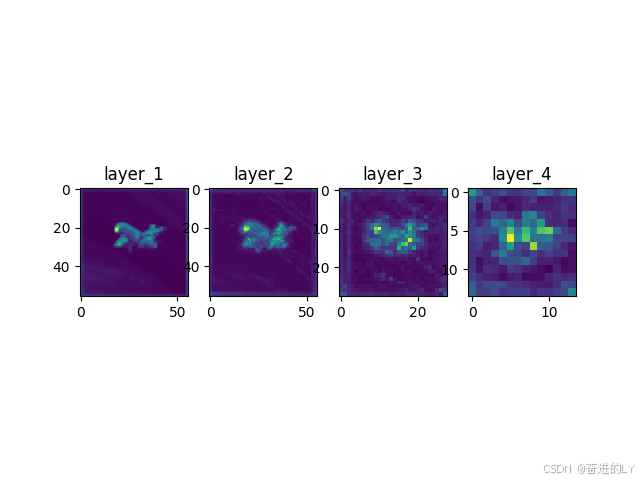
注册hook模块层forward后的输出特征图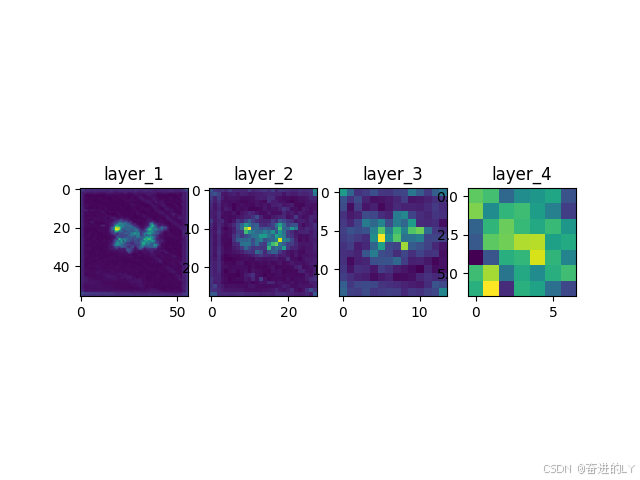
二、特征提取函数IntermediateLayerGetter
2.1 IntermediateLayerGetter函数代码
"""
该函数源自 [from torchvision.models._utils import IntermediateLayerGetter]
在FCN语义分割模型中得到使用
"""

from typing import Dict
from collections import OrderedDict
from torch import nn, Tensor

class IntermediateLayerGetter(nn.ModuleDict):
    """
    Module wrapper that returns intermediate layers from a model

    It has a strong assumption that the modules have been registered
    into the model in the same order as they are used.
    This means that one should **not** reuse the same nn.Module
    twice in the forward if you want this to work.

    Additionally, it is only able to query submodules that are directly
    assigned to the model. So if `model` is passed, `model.feature1` can
    be returned, but not `model.feature1.layer2`.

    Args:
        model (nn.Module): model on which we will extract the features
        return_layers (Dict[name, new_name]): a dict containing the names
            of the modules for which the activations will be returned as
            the key of the dict, and the value of the dict is the name
            of the returned activation (which the user can specify).
    """
    _version = 2
    __annotations__ = {
        "return_layers": Dict[str, str],
    }

    def __init__(self, model: nn.Module, return_layers: Dict[str, str]) -> None:
        if not set(return_layers).issubset([name for name, _ in model.named_children()]):
            raise ValueError("return_layers are not present in model")
        orig_return_layers = return_layers
        return_layers = {str(k): str(v) for k, v in return_layers.items()}

        # 重新构建backbone,将没有使用到的模块全部删掉
        layers = OrderedDict()
        for name, module in model.named_children():
            layers[name] = module
            if name in return_layers:
                del return_layers[name]
            if not return_layers:
                break

        super(IntermediateLayerGetter, self).__init__(layers)
        self.return_layers = orig_return_layers

    def forward(self, x: Tensor) -> Dict[str, Tensor]:
        out = OrderedDict()
        for name, module in self.items():
            x = module(x)
            if name in self.return_layers:
                out_name = self.return_layers[name]
                out[out_name] = x
        return out
该类的调用过程
net = torchvision.models.resnet18(pretrained=True)
return_layers = {'layer4':'out'}
backbone = IntermediateLayerGetter(net,return_layers)
img = torch.randn(1,3,224,224)
features_dict = backbone(img)
print(features_dict['out'])
注意: IntermediateLayerGetter()函数有几个限制:1.对于同一个模块只能使用一次,2.只能用于一级子模块,不能调用二级以下子模块。
2.2 IntermediateLayerGetter函数提取特征示例
from typing import Dict
from collections import OrderedDict
from torch import nn, Tensor

class IntermediateLayerGetter(nn.ModuleDict):
    """
    Module wrapper that returns intermediate layers from a model

    It has a strong assumption that the modules have been registered
    into the model in the same order as they are used.
    This means that one should **not** reuse the same nn.Module
    twice in the forward if you want this to work.

    Additionally, it is only able to query submodules that are directly
    assigned to the model. So if `model` is passed, `model.feature1` can
    be returned, but not `model.feature1.layer2`.

    Args:
        model (nn.Module): model on which we will extract the features
        return_layers (Dict[name, new_name]): a dict containing the names
            of the modules for which the activations will be returned as
            the key of the dict, and the value of the dict is the name
            of the returned activation (which the user can specify).
    """
    _version = 2
    __annotations__ = {
        "return_layers": Dict[str, str],
    }

    def __init__(self, model: nn.Module, return_layers: Dict[str, str]) -> None:
        if not set(return_layers).issubset([name for name, _ in model.named_children()]):
            raise ValueError("return_layers are not present in model")
        orig_return_layers = return_layers
        return_layers = {str(k): str(v) for k, v in return_layers.items()}

        # 重新构建backbone,将没有使用到的模块全部删掉
        layers = OrderedDict()
        for name, module in model.named_children():
            layers[name] = module
            if name in return_layers:
                del return_layers[name]
            if not return_layers:
                break

        super(IntermediateLayerGetter, self).__init__(layers)
        self.return_layers = orig_return_layers

    def forward(self, x: Tensor) -> Dict[str, Tensor]:
        out = OrderedDict()
        for name, module in self.items():
            x = module(x)
            if name in self.return_layers:
                out_name = self.return_layers[name]
                out[out_name] = x
        return out

import torchvision
import torchvision.transforms as TF
from PIL import Image
import matplotlib.pyplot as plt


net = torchvision.models.resnet18(pretrained=True)
net.cuda()

data_transform = TF.Compose([
    TF.Resize((224,224)),
    TF.ToTensor(),
    TF.Normalize(mean=(0.485, 0.456, 0.406), std=(0.229, 0.224, 0.225))
])


show_layers = ['layer'+str(i+1) for i in range(4)]
return_layers = {n: n for n in show_layers}
backbone = IntermediateLayerGetter(net,return_layers)
img = Image.open('./plane.jpg')
img = data_transform(img)
img = img.unsqueeze(0).cuda()
features_dict = backbone(img)
for name in show_layers:
    print('name: {} shape: {} '.format(name,features_dict[name].shape))

""" show features after a certain layer processes """
_,axs = plt.subplots(1,4)
for i, (ax, layer) in enumerate(zip(axs.flatten(),show_layers)):
    img = features_dict[layer].squeeze(0).permute(1,2,0).max(dim=-1,keepdim=True)[0].cpu().detach().numpy()
    ax.imshow(img)
    ax.set_title('layer_{}'.format(i+1))
plt.savefig('after_layer.png')
plt.show()
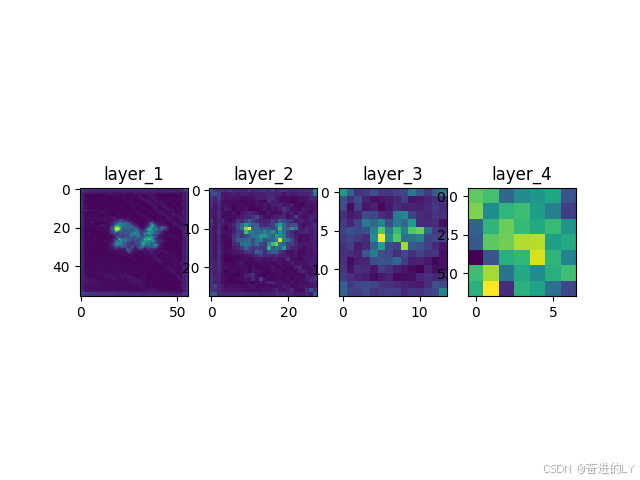
显示效果:
三、总结
上述两种方法都可以有效提取特征并进行可视化展示,提高模型的可解释性。此外,还可以在模型内部的forward()函数中设置中间隐藏变量列表或字典存储想要的某层特征图结果并随着模型结果输出。如果上述代码对于您使用有帮助记得点赞收藏👉😊😀

永洪科技,致力于打造全球领先的数据技术厂商,具备从数据应用方案咨询、BI、AIGC智能分析、数字孪生、数据资产、数据治理、数据实施的端到端大数据价值服务能力。
更多推荐


 8
8 0
0- 0


 已为社区贡献1条内容

所有评论(0)